Ship Season 01 · Day 6

The cache cleaner that knows what a Claude VM is.

Generic Mac cleaners predate the agent era. They flag Adobe caches and ignore that you have a literal Linux disk image growing inside Library/Application Support/Claude/vm_bundles. Disk Doctor doesn't.

Apple Silicon macOS 13+ MIT licensed No telemetry
2.7 MB
Download size
~60 MB
Idle memory
15
Cache categories
$0
Forever
The problem

Your Mac is slowly suffocating and you don't know why.

Vibe coding has a hidden footprint. Every project leaves a tail of regenerable cruft you can't see. The result is a disk that's mysteriously 80% full, Claude crashes mid-task, apps freeze, and you blame the wrong thing.

73%
disk full · the point where macOS swap starts thrashing
7
crash reports in 5 days of agent work
90
MCP servers loaded per Claude session · per session
64MB
free RAM on a 16 GB machine

Three wrong diagnoses

"Claude is broken."— Me, day 1
"The model got dumber overnight."— Me, day 2
"I need a new laptop."— Me, day 3 · the most wrong

It wasn't the model. It wasn't the laptop. It was 84 GB of regenerable agent-era cruft I had no idea was there.

The solution

Two tabs. One job. Find what generic cleaners miss.

01 — The Disk tab

Scan 15 caches. Clean the safe ones in one click.

Every cache category is hard-coded — no user globs, no foot-guns. Three tiers sorted automatically: Safe (regenerates instantly), Confirm (rebuilds on next launch), Your call (apps you might want around).

  • npm cache, node_modules across every project (worktrees included)
  • Claude Code agent VM disk image · Ollama local models
  • opencode + Codex session snapshots and logs
  • Descript / Notion / Slack / Discord / Stremio Electron partitions
  • Xcode DerivedData + iOS Simulators · browser caches · Trash
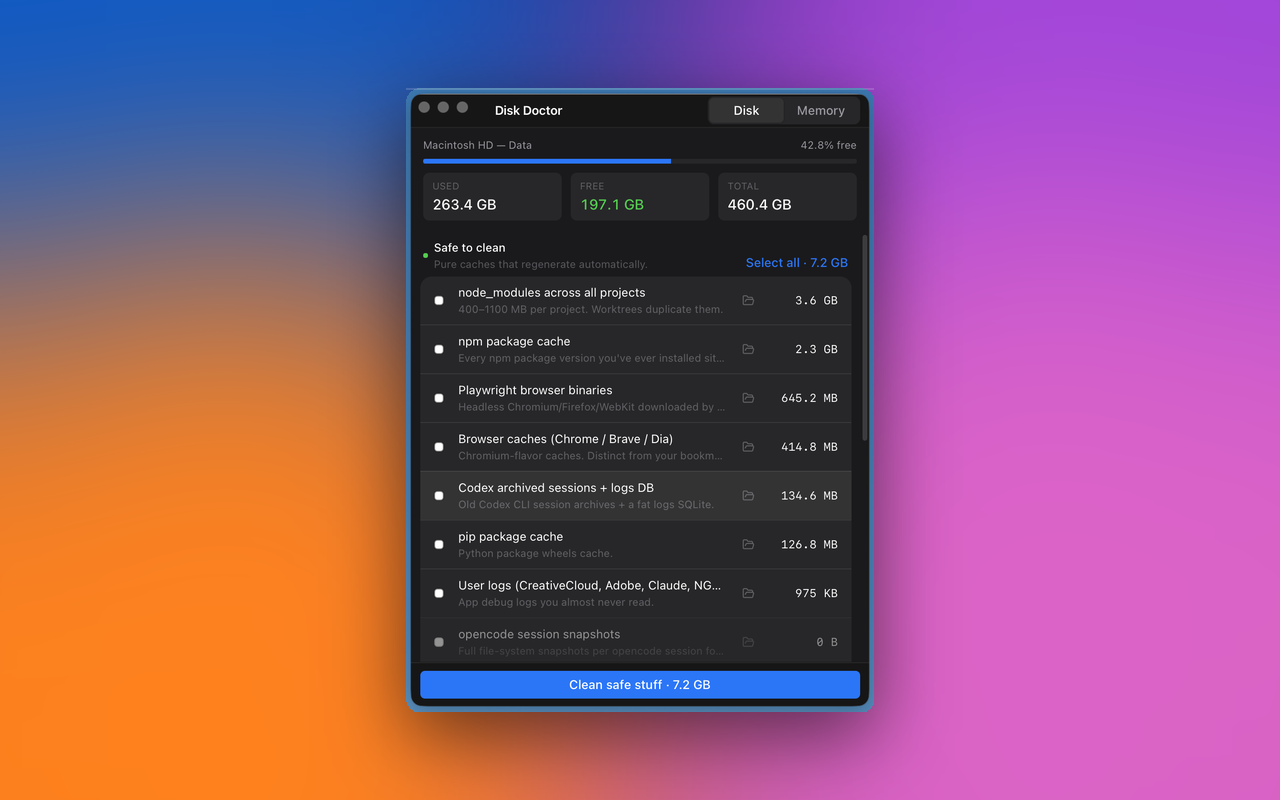
Disk Doctor — scan results showing safe-to-clean tier
T1npm package cache
T1node_modules across all projects
T1opencode session snapshots
T1Codex archived sessions + logs
T2Claude Code agent VM disk
T2Ollama local models
T1Xcode DerivedData + Archives
T2iOS Simulators
T2Descript electron partitions
T2Notion / Slack / Discord / Stremio
T1Browser caches (Chrome/Brave/Dia)
T1pip + Playwright + Homebrew
T1User logs
T1Trash
+ propose one

02 — The Memory tab

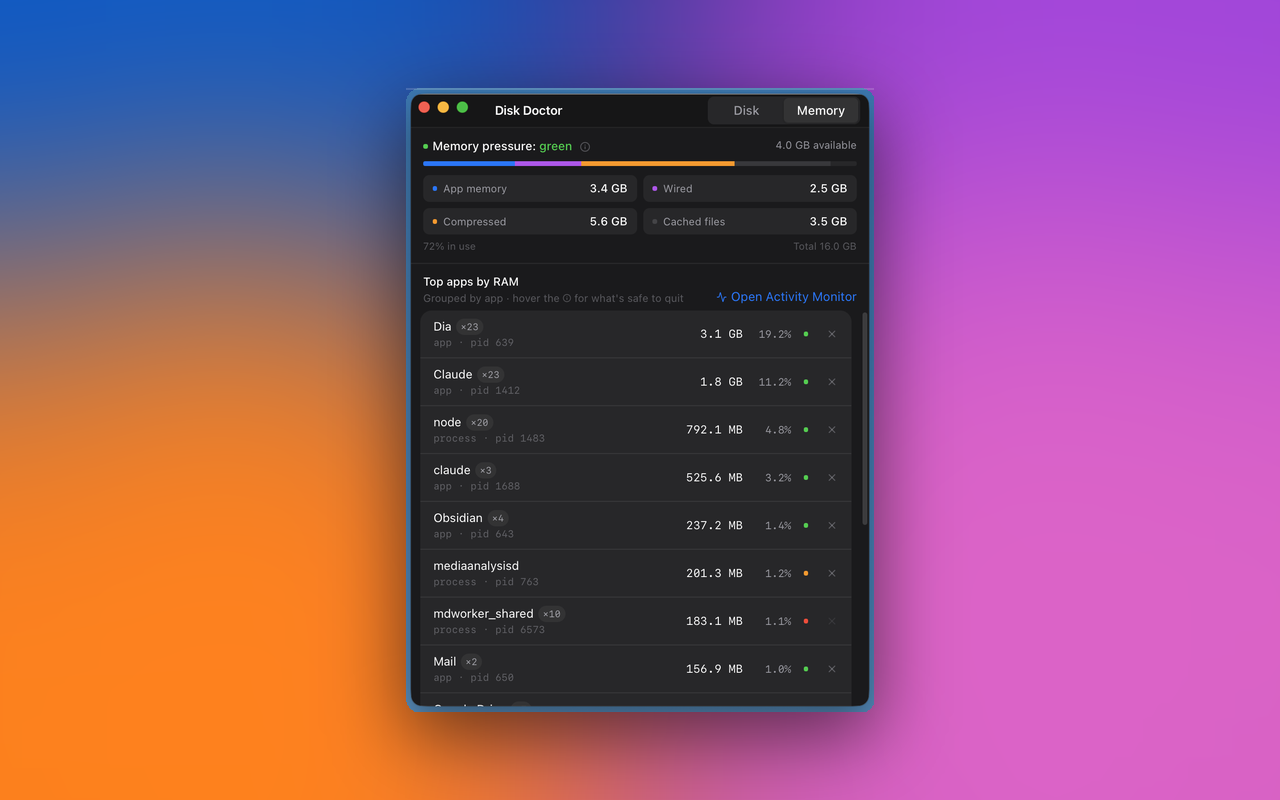
"100% used" is not "stuck." Pressure is the real signal.

macOS uses every spare page for caching by design. A naïve "% used" gauge always shows near 100%. What actually predicts a crash is memory pressure — a kernel-level state. Disk Doctor surfaces it directly, the same way Activity Monitor does, plus what generic tools don't:

  • Top processes grouped by parent .app — "Browser Helper × 4" attributes correctly to Dia or Claude
  • Each row has a hover info-dot explaining what it is and whether it's safe to quit, in plain English
  • System processes classified DoNotKill — the quit button is disabled, no foot-guns
  • One-click polite quit via SIGTERM (never SIGKILL) — apps save state
Disk Doctor — Memory tab with pressure bar and top apps
The irony tax

An app that cleans Electron caches, built in Electron, is a punchline.

Disk Doctor uses the macOS system WebView via Tauri 2. No Chromium bundled. The release binary is 2.7 MB. RAM at idle is around 60 MB. Every Electron app embeds its own Chromium — combined, Descript, Notion, Slack, Discord and Stremio held 11 GB of partition caches on my Mac. The cure has to be smaller than the disease.

# release binary footprint
disk-doctor.dmg      2.7 MB
electron-baseline    ~120 MB

# at-idle RSS (typical)
disk-doctor          ~60 MB
electron-baseline    ~300 MB

# scan time, 15 categories, parallel
disk-doctor          ~1.4 s
node script eq.      ~6 s

Built on:

  • Tauri 2 — system WebView, no bundled Chromium
  • Rust — parallel walks via rayon, sysinfo for memory
  • React 18 + Tailwind v4 — macOS Settings-style UI
  • Universal binary — Apple Silicon (Intel coming v0.2)
Install

Three steps. Sixty seconds.

No signup. No telemetry. No payment. Open source under MIT. If the cleanup helps, drop a star on the repo.

1
Download the .dmg 2.7 MB · Apple Silicon · macOS 13 or later.
2
Drag Disk Doctor into your Applications folder From the mounted disk image, like any Mac app.
3
First launch: right-click → Open → Open Anyway One-time macOS Gatekeeper bypass because this build isn't notarized yet. Apple Developer ID + notarization land in v0.2 (no more warning). Or skip the warning entirely with the command below.
Skip the Gatekeeper warning xattr -dr com.apple.quarantine /Applications/Disk\ Doctor.app
FAQ

What you're probably about to ask.

Is it safe? Can it delete the wrong thing?

Every Tier 1 path is hard-coded to a known cache directory — no user-supplied globs, ever. Tier 2 and Tier 3 deletions route through the macOS Trash via the trash Rust crate, not silent rm -rf. And the app refuses to clean a category if its owning app is running — quit Descript before its partitions get touched, for example.

What's the "Apple cannot verify this app" warning?

v0.1.0 is ad-hoc signed, not notarized through Apple's developer program. The app is safe — you can read every line of source on GitHub — but macOS Gatekeeper requires notarization to launch silently. Right-click → Open → Open Anyway the first time, or run the xattr command above. Proper notarization arrives in v0.2.

Why is there no Intel build yet?

v0.1.0 ships Apple Silicon only because that's where ~95% of active Mac dev users live in 2026. Intel build lands in v0.2 via the GitHub Actions release workflow.

Does it phone home? Telemetry? Analytics?

No. Zero network calls in v0.1. No analytics SDK. No crash reporter. No update check. The app has no notion of "online." History is a single JSON file at ~/Library/Application Support/disk-doctor/history.json — yours alone.

What about CleanMyMac / OnyX / DaisyDisk?

They're good at what they do, but they predate the agent era. They flag Adobe caches and ignore your Claude Code VM, your opencode snapshots, your 28 node_modules across worktrees. Disk Doctor is built specifically for the cruft that builds up when you ship with AI tools. Use both if you want.

Will it work for plain (non-agent) dev work?

Yes. npm cache, node_modules, Xcode DerivedData, pip, Playwright, Homebrew, browser caches, and logs are all useful even without any AI tooling installed. The agent-specific categories simply read as empty in that case.

Can I add a new cache category?

Yes — open a pull request. The catalog is a single Rust file: src-tauri/src/catalog.rs. Adding a category is one struct literal. The README has the contributor walk-through.

What's coming next?

v0.2: Apple notarization, Intel build, customizable scan roots, history sparkline. Post v0.2: opt-in Pro tier with auto-clean schedules, custom rule patterns, and multi-machine sync. Core stays free and MIT forever.

Take it home

Your Mac, lighter.

Free your disk. Free your RAM. Free your weekend.